Batch Survey Configuration
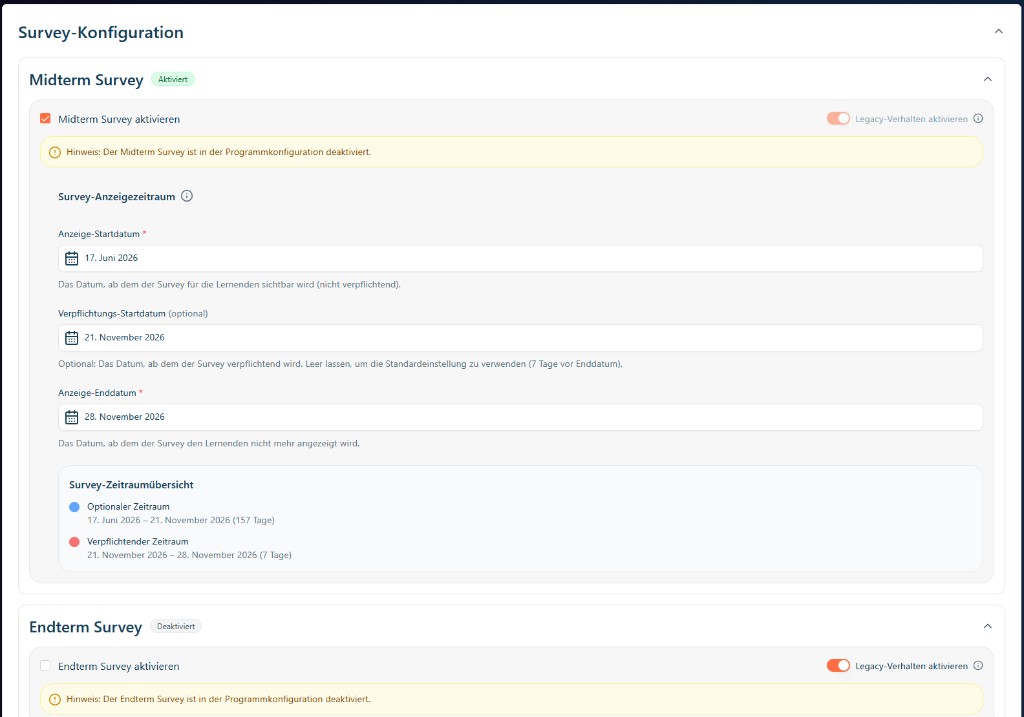
This page documents the standalone Survey Configuration feature in GrowthKit batch editing. Team Learning and Team Sales use it to configure midterm and endterm surveys for a persisted batch, including activation, visibility windows, optional mandatory start, and legacy fallback behavior.
Availability and gating
The survey configuration block is shown only when all conditions are true:
- The batch is persisted (
batch.idexists and is notnew). - The corresponding program-level survey flags are enabled:
surveyConfigurations.midtermEnabledsurveyConfigurations.endtermEnabled
If one flag is off, only the enabled survey section is rendered.
Survey controls
Each survey section (midterm and endterm) provides:
| Control | Purpose |
|---|---|
| [Survey] aktivieren | Enables or disables the survey for this batch. |
| Anzeige-Startdatum | First day the survey is visible to learners. |
| Verpflichtungs-Startdatum (optional) | Date when the survey becomes mandatory. If empty, default mandatory behavior applies. |
| Anzeige-Enddatum | Last day the survey is visible to learners. |
| Legacy-Verhalten aktivieren | Uses legacy fallback behavior where needed (for compatibility with older configuration logic). |
The UI also provides a Survey-Zeitraumubersicht that highlights optional vs mandatory periods.
Screenshot
Behavior and validation
| Aspect | Behavior |
|---|---|
| Persistence | Changes are autosaved as users edit controls. |
| Validation | Invalid date combinations are blocked and surfaced as form feedback. |
| Suggested dates | Midterm ranges can be derived from batch schedule/module timing. |
| Section independence | Midterm and endterm can be configured independently when both are enabled. |
Integration points
- Rendered from the Create/Edit Batch flow: Create/Edit Batch
- Journey step using this feature: Create/Edit Batch (Team Learning journey)
- API surface context: Strapi API reference